
 | |  | |  | |  | | | | | |  |
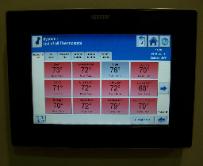
| Climate Cŏntrol™ Network System connectt All HVAC Systems for Easier Installation, Total Control New from Uponor, the Climate Cŏntrol™ Network System is a modular, expandable, integrated hardware and software package that connects all of a structure’s heating, ventilation and air-conditioning (HVAC) components to a single system for better energy efficiency, control and monitoring. And because the Climate Cŏntrol Network System does not have the complexity found in conventional HVAC control systems, it is also faster and easier to install. The new system offers unique advantages to end users, whether it’s the owner of a private residence or an owner, manager or tenant of a commercial building. Graphical Software Package: Users have the option not only to control their comfort from a wall thermostat, but they can also access the entire system via an optional high-definition touch panel interface or even a computer. Internet Accessibility: To view the status of and make changes to their HVAC system remotely, users can simply log on to access their system for complete and total control. Modular and Expandable: The Network System allows users to select which components they need now, and offers the flexibility to include additional components later. |
INTERNET ENABLED CONTROLS:
FROM HVAC TO RADIANT COOLING. THESE CONTROLS LET YOU DO ALOT WITH YOUR SMART PHONE
FROM HVAC TO RADIANT COOLING. THESE CONTROLS LET YOU DO ALOT WITH YOUR SMART PHONE
Settings
Reports
Heating and Cooling
This section displays the following categories:
System Details – This is where you set your temperature, turn your thermostat on or
off from your computer/smart phone and adjust your humidifier if you have one
Program – How you have your thermostat currently programmed
Weather
Today – your current settings of the day
Vacation Calender – Go ahead and enter the days you’re going to be on vacation so
you dont forget. I had no trouble entering the days of my vacation in this section, but
I couldnt figure out how to adjust the temperature settings while I’m on vacation
from the web portal. I think you may have to do this at the Smart Thermostat.
You can add/remove each category to appear on your Heating and Cooling section of
your web interface. They also make the categories easy to move around and the size
of the category boxes adjust to fit with the other categories as you move them
around the screen. They put a lot of thought into this and made it very user friendly.
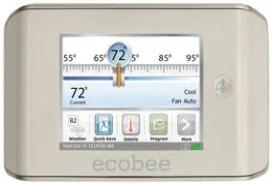
From the web portal you can enter your address (or just zip code) in order to display
the local weather. Once you do this a weather icon will be displayed on the Smart
Thermostat. If you tap the weather icon on the Smart Thermostat you can see the
forecast for the day and the week. Pretty useful if you just want a quick snapshot of
the day when you are getting ready in the AM and dont want to turn on your
computer! This is also useful for seeing how your AC/Heat responds to the outside
temperature in the great “Reports” feature in the Ecobee web portal.
Reports
Heating and Cooling
This section displays the following categories:
System Details – This is where you set your temperature, turn your thermostat on or
off from your computer/smart phone and adjust your humidifier if you have one
Program – How you have your thermostat currently programmed
Weather
Today – your current settings of the day
Vacation Calender – Go ahead and enter the days you’re going to be on vacation so
you dont forget. I had no trouble entering the days of my vacation in this section, but
I couldnt figure out how to adjust the temperature settings while I’m on vacation
from the web portal. I think you may have to do this at the Smart Thermostat.
You can add/remove each category to appear on your Heating and Cooling section of
your web interface. They also make the categories easy to move around and the size
of the category boxes adjust to fit with the other categories as you move them
around the screen. They put a lot of thought into this and made it very user friendly.
From the web portal you can enter your address (or just zip code) in order to display
the local weather. Once you do this a weather icon will be displayed on the Smart
Thermostat. If you tap the weather icon on the Smart Thermostat you can see the
forecast for the day and the week. Pretty useful if you just want a quick snapshot of
the day when you are getting ready in the AM and dont want to turn on your
computer! This is also useful for seeing how your AC/Heat responds to the outside
temperature in the great “Reports” feature in the Ecobee web portal.
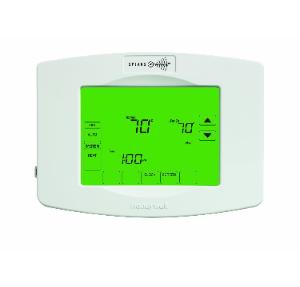
| 7-Day Programmable; Four daily periods; Cancel unneeded periods; Selectable non-programmable; Universal application, Heating and cooling energy savings set points allows the homeowner to put the thermostat into a energy savings mode from the other Z-Wave devices; Large, clear backlit display with a viewing area of 10-Square Inch; Ability to select multiple days (patented) - Allows the consumer to easily through the programming process only showing necessary information and choices on each screen; hold; Changeover - Can configure for auto or manual system changeover; Smart Response Technology; Real Time clock - Keeps time during a power failure and will automatically update the time for daylight savings. |